


Red-bellied Woodpecker detected
Backyard Bird Cam at 11:01 AM
Now


$69.98
Loved by Bird Watchers
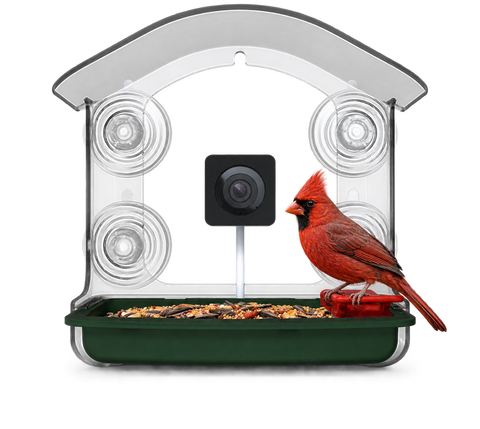
Window Bird Cam
Includes cam & feeder
Supports up to a 512 GB microSD card in exFAT or FAT32
Meet the birds at your window with species identification and alerts from Bird Watch.
Species ID, 60-day cloud storage, and Bird Wiki—all in one upgrade.
Oct 29, 2026
Oct 29 · 2:45 PM

Dryobates pubescens
Tap to compare
 Adult reference
Shared adult plumage.
Every Bird Cam includes 3 months of Bird Watch. Here’s what you can do with and without a plan.
| Feature | Free | With Bird Watch |
|---|---|---|
| Live view | Included | Included |
| Local microSD recording | Included | Included |
| Bird detection | Included | Included |
| Species identification | Not included | Included |
| Bird facts & Wiki | Not included | Included |
| Monthly Bird Highlights | Limited | Included |
| Bird Log & Numbers | Limited Bird Log | Included |
| Bird alerts | With 5 Min. cooldown | No cooldown |
| Event playback | Alert thumbnail | Full-length visit video |
| Cloud history | Not included | 60 days |
| Bird Watch access | Not included | First 3 months free |
Local recording requires a microSD card (sold separately).


Get notified when a bird stops by, then open the Wyze app to watch live.


Tuned for 4–8 inch macro focus in crisp HD, your feathered guests fill the frame while the backyard softly blurs.


Fill the built-in side pod with nectar to invite hummingbirds right to your glass, and catch every wingbeat in smooth 30 fps video. The highest frame rate of any Wyze Cam.

Keep your view open with a clear, low profile mount. Four heavy-duty twist-lock suction cups grip securely through rain, wind, and snow.

The optional perch extends their landing space in front of the lens, so you can watch birds between bites. Sold separately.

Birds don't wait around. While other cams buffer, you're already watching live. Open the Wyze app to watch visitors at your window, wherever you are.


Plugs in by the window, so there’s no solar panel to adjust or battery to bring inside for charging.

A quick look at your Window Bird Cam before it arrives.
Find your answer. Get back to the birds.
Choose a clear, screen-free pane where you can reach the feeder for refills. Make sure the included 3 m (9.8 ft) cable can reach an indoor outlet. Pair the camera in the Wyze app first. Hold it at the spot you have in mind and check the live view before securing the feeder to the glass.
The camera mounts inside your window, while the feeder mounts outside, directly opposite it. This keeps the camera indoors while birds feed outside.
Bird Cam connects to a 2.4 GHz Wi-Fi network. Choose a window with a reliable signal from your router.
Leave the feeder mounted and slide out the seed tray for a rinse or refill. Drainage holes in the tray let rainwater out. The separate side pod holds nectar for hummingbirds.
Yes. The seed tray slides out without tools for easy cleaning, so you can leave the feeder mounted to the window. The nectar pod is removable, too. Clean both regularly and let the seed tray dry before refilling.
With Bird Watch, back-to-back visits can each trigger a species alert. Tap the notification to open the live view. With the camera alone, alerts tell you a bird was detected, with a cooldown between notifications.
Yes. Open the camera in the Wyze app and turn off its alerts under Settings → Notifications. You can still open the live view whenever you like. For a temporary break from all Wyze notifications, tap the bell on the Home tab and choose a snooze duration.
With Bird Watch, see the species name in your bird notifications, browse identified visits in Recent Sightings, or check Species Sightings in Bird Numbers. Open a recorded visit and tap the book icon to explore Bird Wiki, compare adult male, adult female, and juvenile images, and learn more about your visitor.
The camera has no infrared night vision. It is designed for daylight and dawn/dusk bird activity.
Bird Watch saves full visit videos in the cloud for up to 60 days, even with the card slot empty. Open the visit in Recent Sightings to replay it. Download a favorite to your phone before the 60 days are up to keep your own copy.
Yes. Insert a microSD card up to 512 GB (sold separately). In the camera’s microSD card settings, turn on recording and choose Continuous for around-the-clock footage or Events Only for motion. Local recording works with or without Bird Watch.
Bird Numbers shows visits and species by day, week or month. Several visits can come from the same species. To see those clips together, filter Recent Sightings by species. Monthly Highlights gives you a recap to save or share.
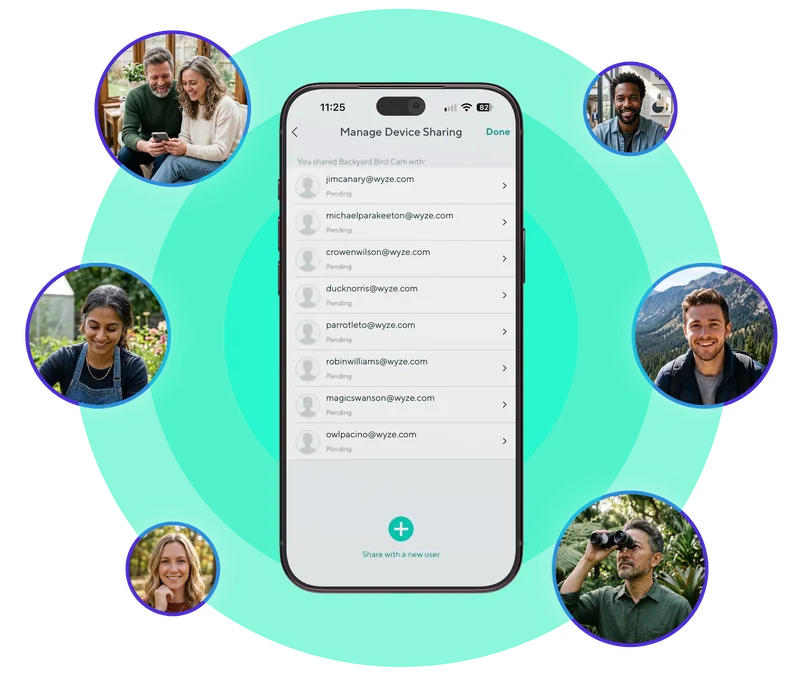
Yes. In the Wyze app, go to Account → Sharing → Share With New User. Enter the email they use for Wyze, select your Bird Cam and send the invitation. Once they accept, they can open your feeder from Home in their own account.
Open the visit in Bird Watch and tap Share to send that clip. The recipient gets the visit you chose. Watching your live feeder takes a separate camera-sharing invitation.
No. Window Bird Cam captures video without audio and has no microphone, speaker, or siren.
Every Window Bird Cam includes three months of Bird Watch, whether or not you already have a Wyze plan. There’s no automatic charge when those three months end. If you choose to continue with a paid membership, Bird Watch is $6.99/month per camera. You can keep watching live, share the feeder, get basic bird alerts and record locally with a microSD card.
Birds can feed from the included seed tray without it. The optional perch, sold separately, adds another landing spot and more ways to feed. Its fruit fork, suet ball feeder, and jelly cup let you offer fresh fruit, suet, and jelly for a wider variety of visitors.
Bird Watch is a separate subscription made exclusively for Window Bird Cam. It isn’t included with Cam Plus or other Wyze security plans.
Bird Watch is licensed per camera. Each Window Bird Cam needs its own subscription for species ID, cloud visit videos, and the other Bird Watch features.
No matches yet. Try “alerts,” “sharing,” or “seed.”


