Skip to product information
1 of 7

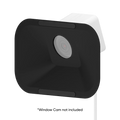
Wyze Window Cam Wedge Mount

Wyze Window Cam Wedge Mount

Top Accessory
Commonly Bundled Item
Style
$14.98
In stock
Get it as soon as
30-day hassle-free returns.

Easily Mount

Inside Window

Easy Peasy Install

A blue and white logo for Wyze.
Wyze.com Exclusive BENEFITS
18-month extended warranty

Get an 18-mo extended warranty when you buy this product on wyze.com. Also get special bundles, unique promos, + rewards with each order

View full details
  • 20° Camera Tilt Angle

    20° Camera Tilt Angle

  • Secure Adhesive Mounting

    Secure Adhesive Mounting

  • Reduced Glare and Reflections

    Reduced Glare and Reflections

  • Easily Mount Inside Window

    Easily Mount Inside Window

  • Compatible Wyze Products: Wyze Window Cam 
  • Dimensions: 6.37 x 3.99 x 0.92 in (162 x 101.5 x 23.5 mm) 
  • Model: WYZEWCWM 
  • Weight: 50g 
  • Material: Plastic 
  • Tilt Angle: 20° 
  • Temperatures Operating Temperature: 32°F - 104°F (0°C - 40°C)
  • Storage Temperature: -4°F - 158°F (-20°C - 70°C) 

20° View Angle Tilt

Place Wyze Window Cam in your second floor window without missing any events down on the ground.

  • Tilted Down

    Need to mount it on the second floor? No problem. Angle it down to catch all the action down on the ground.

  • Tilted Up

    Place it in a basement window tilted up to catch everything happening outside and uphill.

  • Tilted Left/Right

    Monitor your front porch or look towards the side of you house with a tilted view either left or right.

Secure Adhesive Mounting

Once you stick it, it stays stuck. Never worry about it falling off your window.

Specialized Design to Reduce Glare

A specialized angled design removes reflections to give you the clearest footage possible through a window.

Easily Mount Inside Window

Just peel, stick, and plug in the camera. We've included an extra-long 10 ft power cable with cable clips for tidy mounting.

Support Articles

To install Wyze Window Cam Wedge Mount:

  1. Go to your mounting location. Thoroughly clean and dry the inside of the window where you plan to mount your camera. Install on window glass only. Do not mount on a window behind a screen.
  2. Peel off the film from the wedge mount. Do not trim the mounting sticker.
  3. Affix the wedge mount onto the window. Stick the mounting sticker horizontally to minimize glare and for the best image quality.
  4. Remove the plastic from the camera lens, then press the camera onto the wedge mount.
  5. Route the camera’s power cable along the windowsill and/or wall with the included cable clips.

To minimize glare.

The larger sticker is designed to minimize glare caused by indoor lighting reflecting behind your Wyze Window Cam. So not trim the sticker.

For best results, always mount the sticker horizontally.

Added to your cart
FREE shipping on orders $59+
Subtotal
$0.00
View cart