Passer au contenu
View our Accessibility Statement
Passer aux informations produit
1 de 14

Caméra solaire Wyze Pan

Caméra solaire Wyze Pan

Maintenance-free battery power with solar. 360° protection.

$99.98CAD
Quantity: 1
1
2
3
4
5
6
7
8
9
10
En rupture de stock
Get it as soon as
Retours sans tracas sous 30 jours.
En rupture de stock
AVANTAGES exclusifs de Wyze.com
Garantie prolongée de 18 mois

Bénéficiez d'une garantie prolongée de 18 mois à l'achat de ce produit sur wyze.com. Profitez également de lots spéciaux, de promotions uniques et de récompenses à chaque commande

  • Panneau solaire intégré à haut rendement
  • Couverture panoramique à 360° et inclinaison à 70°
  • Suivi des personnes par l'IA
  • Résolution 2K HD avec WDR
  • Montage rapide et facile
  • Résistance aux intempéries IP65
Voir les détails complets
  • Énergie solaire sans entretien

    Énergie solaire sans entretien

    Un panneau solaire intégré fournit une alimentation continue à la batterie avec seulement une heure d'ensoleillement par jour.

  • Couverture panoramique/inclinable à 360° + 2K HD

    Couverture panoramique/inclinable à 360° + 2K HD

    Visualisez chaque détail sans angle mort. Couvrez l'intégralité de l'espace grâce à la fonction panoramique et d'inclinaison.

  • Suivi des personnes par l'IA

    Suivi des personnes par l'IA

    Détecte et verrouille les personnes, les suivant partout où elles vont.

  • Montage et installation rapides et faciles

    Montage et installation rapides et faciles

    Installez-le où vous voulez et fixez-le en quelques minutes. Profitez d'une installation facile grâce à Bluetooth®.

Specs

  • Model: WYZESCPWH
  • Materials:
    Body: Polycarbonate
    Lens: Glass + Plastic
  • Certifications: FCC/IC, IP65, RoHS, REACH, CA65

Audio

  • Microphone: Built-in, digital
  • Siren: 105dB
  • 2-Way Audio

Storage & Alerts

  • Alerts: Push notifications
  • Cloud Storage: Stored in the AWS cloud*
    *Wyze Service subscription required
  • Local Storage (microSD card required):
    Supports 8-32 GB microSD cards in FAT32 format
    Supports up to 512 GB microSD cards in exFAT format

Weather & Temperature

  • Weather Resistance: IP65
  • Operating Temperature: -4°F - 122°F (-20°C - 50°C)
  • Storage Temperature: -4°F - 140°F (-20°C - 60°C)

Image

  • Resolution: 2K (3MP)
  • Digital Zoom: 8x 
  • Field of View: 
    Diagonal: 130°
    Horizontal: 108°
    Vertical: 57°
  • Frame Rate:
    Daytime: 20 FPS
    Nighttime: 15 FPS
  • Night Vision:
    Color Night Vision
    IR LEDs: 2x 850nm
  • Spotlight: 2x White LED (100 lm)
  • Pan/Tilt Range:
    Horizontal: 360°
    Vertical: 70°

Connectivity & Compatibility

  • OS Requirements: Android 9.0+ or iOS 15.0+
  • Wi-Fi: 802.11 b/g/n 2.4 GHz, Wi-Fi 4/5/6
  • Bluetooth® Setup

Power

  • Power Adapter: 5V/2A (not included)
  • Input: 110-240V
  • Cable: Type-C to USB-A (2 ft. / 0.6 m)
  • Integrated Solar Panel (1.8W)
  • Battery: 6400mAh, non-removable Lithium-ion battery
  • Charging Time: 0-100% in 4-6 hours using the cable/adapter
  • Battery Life: Up to 6 months (if not connected to power)
  • Wyze Solar Cam Pan x 1
  • Solar Panel x 1
  • Camera Mounting Bracket x 1
  • Solar Panel Mounting Bracket x 1
  • Charging Cable (2ft) x 1
  • Camera Mounting Kit x 1
  • Solar Panel Mounting Kit x 1
  • Camera Mounting Drilling Guide sticker x1
  • QSG x1

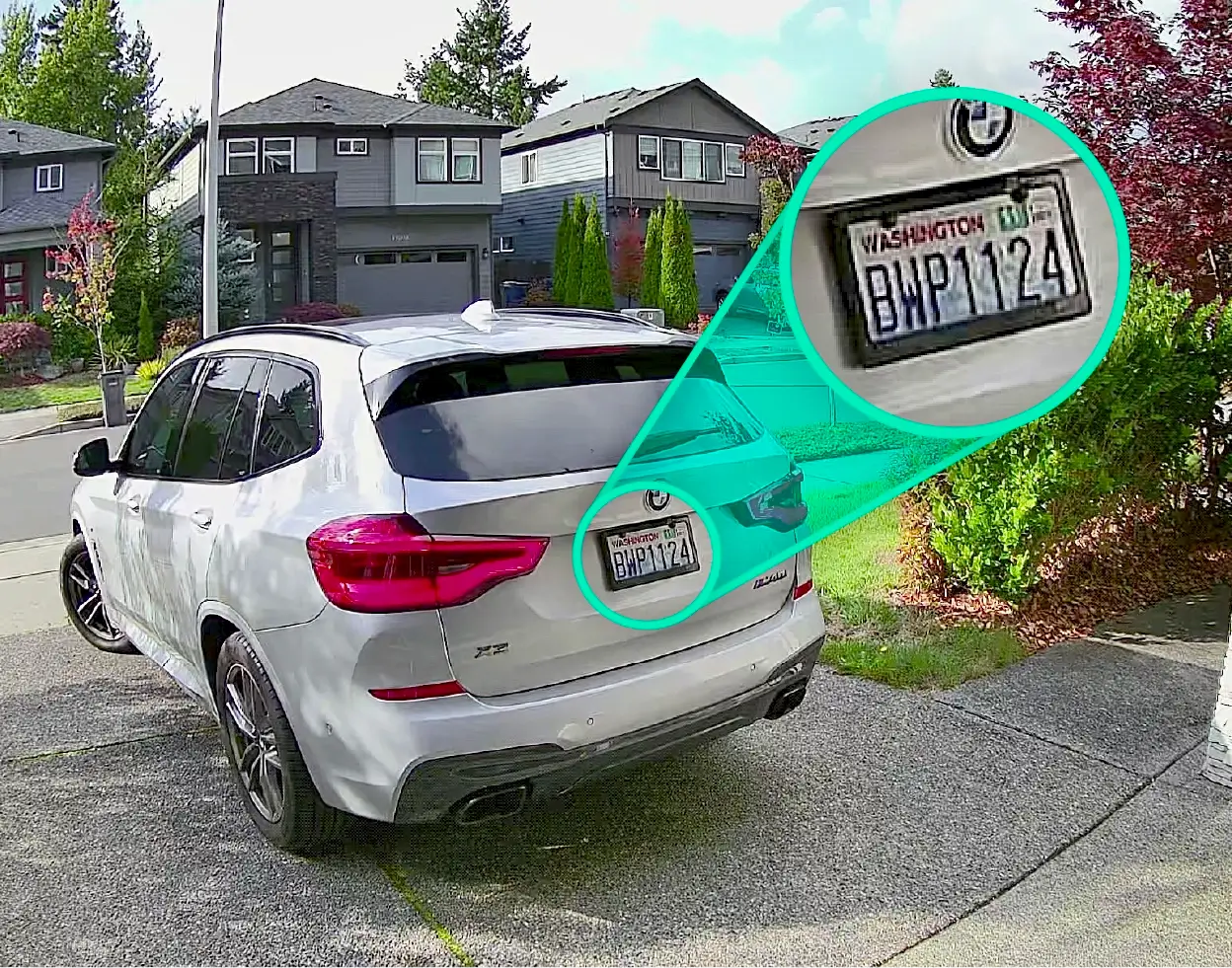
Wyze Solar Cam Pan is a revolutionary solar-powered, wire-free outdoor security camera with an integrated solar panel, offering 360° pan-and-tilt coverage, AI person tracking, 2K resolution, color night vision, and a motion-activated spotlight.

Unlike other battery-powered Wyze Cams, Wyze Solar Cam Pan comes with an integrated solar panel and a built-in 6400 mAh rechargeable Li-ion battery for truly maintenance-free power. It is our only wireless camera with full 360º pan-and-tilt coverage, smart AI person tracking, and crystal-clear 2K resolution, all designed for outdoor security without the hassle of swapping and charging batteries.

Wyze Solar Cam Pan's high-efficiency ETFE solar panel is designed for maintenance-free performance. With as little as 1 hour of direct sunlight per day, the solar panel can generate enough energy to keep the camera running continuously with normal use. Battery performance may vary due to mounting location, seasonal changes, and event activity levels.

Wyze Solar Cam Pan is truly wire-free, and can be installed in a snap. You can mount it anywhere without worrying about power outlets, complicated mounting equipment, or running wires.

No, Wyze Solar Cam Pan comes with AI-powered person tracking without the need for a subscription. The camera follows and tracks the detected person when this feature is enabled in the Wyze app.

Wyze Solar Cam Pan provides 360° pan and 70° tilt coverage, ensuring no blind spots around your property.

Yes, Wyze Solar Cam Pan comes with a motion-activated spotlight, Motion Warning, and a 105dB siren to help warn and deter unwanted visitors.

Yes, Solar Cam Pan supports Bluetooth® setup for fast and seamless pairing with the Wyze app.

Wyze Solar Cam Pan can detect motion up to 30 feet away when mounted 8 feet above the ground, and tilted 30º downward (as recommended).

No, and it is not compatible with Wyze Base Station. Wyze Solar Cam Pan is set up using Bluetooth and connects directly to your 2.4 GHz home Wi-Fi network.

Camera: You can either mount Wyze Solar Cam Pan camera on a vertical wall or under eaves using the included camera mounting bracket and mounting kits. Solar Panel: You can either mount the solar panel on top of the camera or mount the solar panel separately, leveraging the attached 10-ft cable on the solar panel.

Yes, you can record continuously to a microSD card as long as the camera is connected to 5V/2A AC power.

Just be sure to properly secure the Micro SD card slot cover to avoid water damage. If using the continuous plug-in power option, a Wyze Cam Universal Outdoor Power Adapter (latest version) is required for outdoor use.

Yes, Solar Cam Pan is equipped with a 6400 mAh lithium battery, allowing the camera to operate through cloudy or rainy conditions without solar charging, and last 2-6 months under normal usage. Please note that solar charging will automatically pause to protect the battery when the outside temperature drops below 32°F (0°C).

Caméra Wyze + Le Soleil. Le coup de foudre.

Laissez le soleil faire le travail. ☀️ Un panneau solaire ETFE intégré à haut rendement fournit une alimentation continue à la batterie avec une heure d'ensoleillement par jour.

Couverture panoramique/inclinable à 360° avec Suivi des personnes par l'IA.

L'intelligence artificielle Edge détecte et suit les personnes, où qu'elles aillent. Sécurisez un espace entier grâce à la fonction panoramique et d'inclinaison. Contrôlez à distance via l'application Wyze pour visualiser précisément ce que vous souhaitez.

Montage flexible des panneaux solaires.

Pour une installation propre, fixez le panneau solaire sur le dessus de la caméra. Vous pouvez aussi le placer séparément, là où le soleil est le plus fort, pour une charge optimale. À vous de choisir.

Journées nuageuses ? Pas de problème.

Le soleil se fait rare chez vous ? Pas de souci. La batterie lithium-ion intégrée de 6 400 mAh offre jusqu’à 6 mois d’autonomie.

Résolution 2K HD avec WDR

L'enregistrement vidéo d'une netteté exceptionnelle, grâce à un large champ de vision, capture chaque détail, de jour comme de nuit. La technologie WDR (Wide Dynamic Range) équilibre les hautes lumières et les ombres les plus profondes pour que rien ne soit perdu.

Projecteur et sirène activés par le mouvement.

Dissuadez les intrus ou éclairez votre chemin grâce à un projecteur à détecteur de mouvement. Activez la sirène puissante de 105 dB pour une sécurité renforcée.

Résistance aux intempéries IP65.

Goutte. Éclaboussure. Plouf. Peu importe la météo, cette caméra est infatigable. Robuste, elle est conçue pour résister aux intempéries. Son design élégant s'intègre parfaitement à votre intérieur.

  • Audio bidirectionnel

    Écoutez le son et parlez via la caméra depuis n'importe où grâce à l'application Wyze.

  • Fonctionnalités de détection

    Recevez une notification sur votre smartphone lorsqu'un mouvement est détecté.

  • Notifications IA et alertes descriptives

    Personnalisez vos détections et notifications. Recevez des alertes détaillées grâce aux alertes descriptives, disponibles avec Cam Unlimited Pro. Cliquez pour en savoir plus .

  • Compatibilité Wi-Fi 6

    Bénéficiez d'une connexion stable et fiable grâce à la prise en charge du Wi-Fi 6 (routeur Wi-Fi 6 requis), pour une diffusion en direct plus fluide.

Plus à aimer

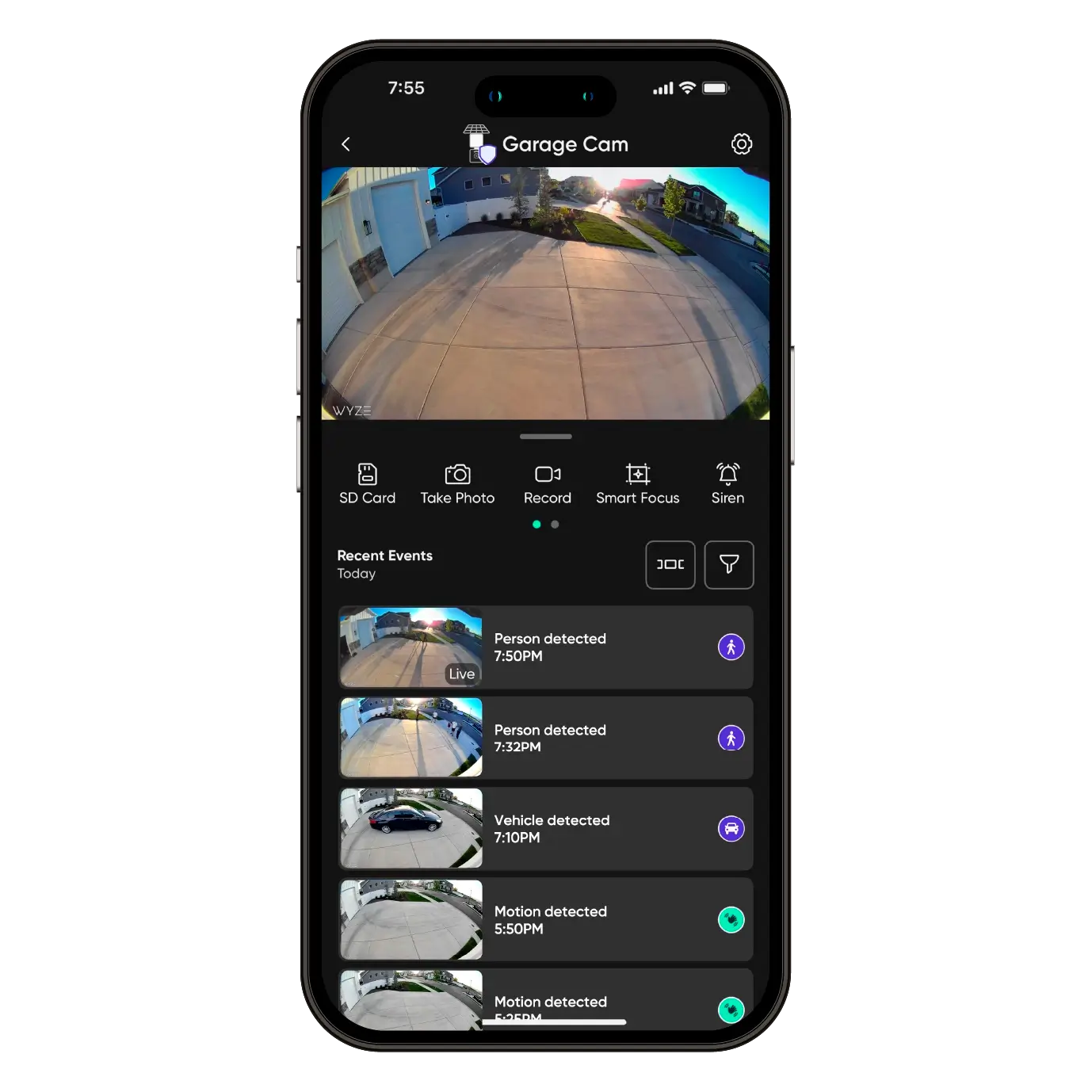
Vous avez raté quelque chose ? Bien sûr que non ! Grâce à votre caméra et à la meilleure application domotique au monde, visionnez les enregistrements d'un simple clic, où que vous soyez.

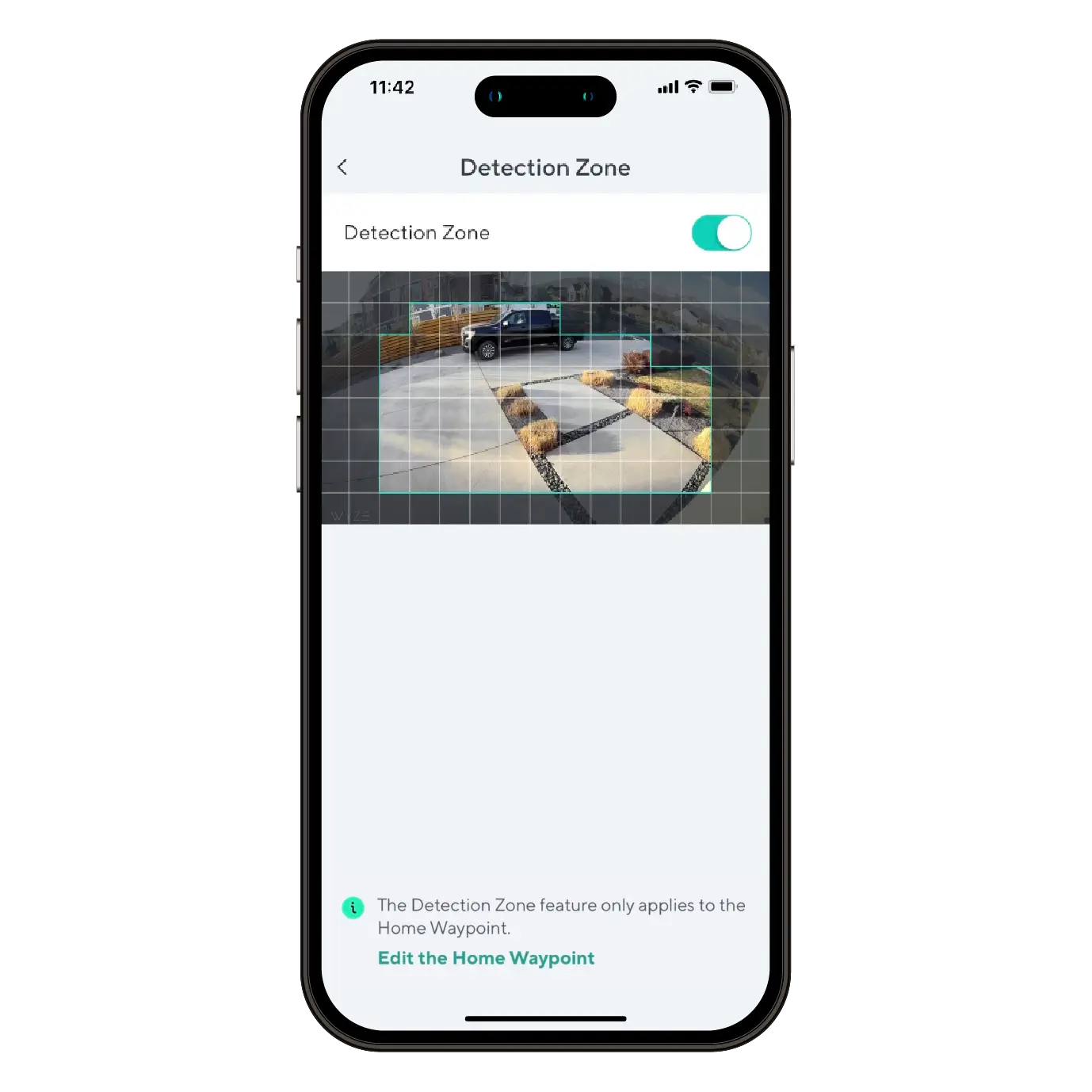
Surveillez des zones spécifiques pour détecter les mouvements et ne recevez de notifications que lorsque c'est important.

Un confort et une personnalisation à portée de main grâce à des intégrations comme Amazon Alexa, Google Assistant, IFTTT et Wyze Rules.

Découvrez notre design unique en action.

Comment installer la Wyze Cam Pan solaire

While following the Wyze Solar Cam Pan Setup Guide, you'll be prompted to install your camera. Follow along with this video and article to install your Wyze Solar Cam Pan.

What's in the box?

Note: A 5V/2A power adapter is required to charge Wyze Solar Cam Pan using an outlet.

  1. Follow along in the Wyze Solar Cam Pan Setup Guide. Once successfully paired, tap Next.
  2. Ensure you have the required tools. Tap Next.You will need a ladder and a Philips-head screwdriver.
  3. Review the series of installation tips, tapping Next on each.Avoid pointing the camera at trees and busy roads.Position your camera for better motion detection.Mount the camera 7-10 feet up, angled 30° down.
  4. Check your Wi-Fi Strength. Tap Next.
  5. If you have a strong connection, tap Next.
  6. Choose how you'd like to install your Wyze Solar Cam Pan and solar panel.Tap Install Together to attach the solar panel to the camera before mounting.Tap Install Separately to mount the solar panel and camera separately.
  7. Once installation is complete, follow the in-app instructions to complete setup.
  8. You're all set! Tap Done.

Before you begin setup:

  1. Download the Wyze app on your smartphone or tablet.
  2. Connect your device to a 2.4 GHz Wi-Fi network, and enable BluetoothⓇ.
  3. Unpack your Wyze Solar Cam Pan box, removing all plastic and packing materials.Be sure to remove the plastic film from the lens.
  4. Plug the camera into power using the provided Type-C cable, and a 5V/2A adapter (not included).You must fully charge Wyze Solar Cam Pan before setup and installation.The camera’s status light will turn solid red while charging, and solid blue when charging is complete.

To set up your Wyze Solar Cam Pan:

  1. In the Wyze app, tap Home, then tap + plus sign on the top right.
  2. On the Add menu, tap Device.
  3. Tap Cameras > Pan and Tilt Camera > Wyze Solar Cam Pan.
  4. Ensure that your camera is fully charged. Tap Begin Setup.The camera's status light will be solid red when charging, and solid blue when fully charged.
  5. Single-press SETUP on top of the camera. The camera will say "ready to connect." In the app, check the box next to It said, Ready to connect".
  6. Tap Next.
  7. If BluetoothⓇ hasn't been enabled, you will be prompted to allow BluetoothⓇ and location access. Tap Next.If BluetoothⓇ and location access has already been enabled, it will skip to the next step.
  8. The app will automatically begin searching for and pairing with your Wyze Solar Cam Pan.If you have multiple Wyze Solar Cam Pans, select the correct camera by tapping the MAC address that matches the address on the top of the camera.
  9. Select your 2.4 GHz Wi-Fi network and enter your network password. Tap Next.Tap the icon in the password field to display the password to ensure it was entered correctly.
  10. Your device will continue pairing. Once paired, tap Next.
  11. Once connected, the app will show an installation guide with placement tips.
    Check out: Wyze Solar Cam Pan Installation GuideIf you want to use the installation guide now, tap Next.If not, tap Skip.
  12. Now it's time to set up your Home Waypoint, your cam's default view. Tap Continue.The Home Waypoint is required for this initial setup.Once your camera connects to the live stream, the camera will automatically calibrate for accurate positioning.
  13. Use the arrows in the app to pan/tilt your camera until you reach your desired Home position. Tap Set and then tap Next.Camera mounted upside down? Tap Rotate 180° to flip the live stream.
  14. Name your camera using the text field, or by choosing a suggestion. Tap Next.
  15. You may be prompted to try a Wyze security plan, if you're not already a subscriber. Tap Continue.
  16. Set up some automations on the Things to Try page, or tap Skip then Done.
  17. Enjoy your new Wyze device!

You’ll find the status light on the front of Wyze Solar Cam Pan, to the right of the lens. The charging indicator light is on the back of the camera.

⚡️ All Wyze devices have a handy status light that helps determine what state the device is in.

Wyze Solar Cam Pan Status Light Guide

Wyze Solar Cam Pan Status Lights:

  • Flashing red – The device is ready to set up.
  • Flashing red and blue – The device is connecting to the network.
  • Solid red – The device has detected motion or is live streaming.
  • Solid blue – Setup was successful; the device is powered and fully connected.

Wyze Solar Cam Pan Charging Indicator Lights:

  • Solid red – The device is charging.
  • Solid blue – The device is fully charged.
Added to your cart
Livraison GRATUITE pour les commandes de 59 $ et plus
Subtotal
$0.00
View cart